Turn Any Photo Into a GTA Online-Style Screenshot
Upload a selfie, car or street photo and Automatica's GTA Online template rebuilds it as an in-game screenshot. Here's how it works and how to get the best result.
Upload a selfie, car or street photo and Automatica's GTA Online template rebuilds it as an in-game screenshot. Here's how it works and how to get the best result.
Upload a selfie, car or street photo and Automatica's GTA Online template rebuilds it as an in-game screenshot. Here's how it works and how to get the best result.
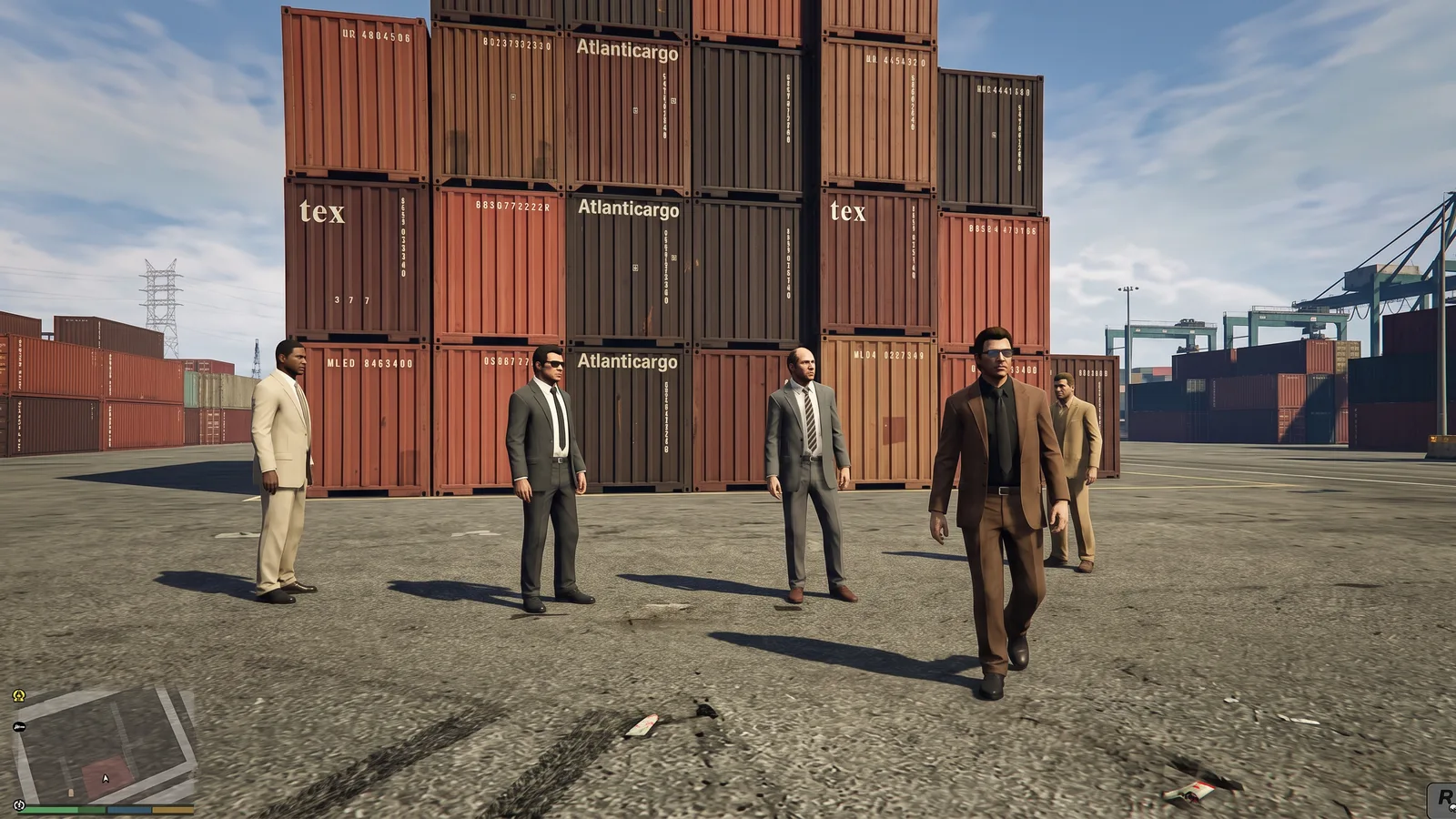
Automatica's GTA Online template rebuilds any photo as if it had been captured inside the game. Upload a selfie, a car, a holiday snap or a street scene, and it comes back as a third-person gameplay screenshot with Los Santos lighting, game-ready textures and the familiar GTA V colour grade.
It isn't a colour filter laid over your photo. The template reconstructs the whole scene as 3D game assets, which is why the results look like real in-game screenshots rather than edited photos.
Rebuilds people as game characters: faces, hair and clothing take on GTA V proportions, with matte skin, slightly stiff hair and flat fabric textures.
Turns the setting into Los Santos: buildings, roads, trees and street props become modular game assets that feel like Los Santos or Blaine County.
Applies in-game lighting: strong sunlight or an overcast sky, hard-edged shadows, imperfect reflections and slightly saturated colour.
Frames it like gameplay: a third-person or free-camera view with slight wide-angle distortion and no depth-of-field blur, like a Rockstar Editor capture.
Open the template. Go to the GTA Online effect template in Explore and sign in or create an account.
Upload your scene. Add your photo to the "Scene to transform" slot. Portrait and landscape photos both work.
Generate. The template runs on Nano Banana 2 Edit and returns one 1K image per run.
Compare a few runs. Each generation rebuilds the scene slightly differently, so run it two or three times and keep the most convincing screenshot.
Save or share. Download the PNG or keep it in your library to edit, upscale or animate later.
Anything with a clear subject and a readable setting works. These tend to look the most like real gameplay:
Cars and motorbikes: a parked car on a street or in a car park becomes a mission-ready ride.
Streets and city scenes: high streets, junctions and petrol stations translate naturally into open-world locations.
Holiday photos: beaches, piers and sunny promenades suit the Los Santos look.
Selfies and full-body shots: you become a playable character standing in your own surroundings.
Group photos: your friends become a crew, as long as each face is reasonably large in the frame.
For the cleanest result, use a sharp daylight photo and avoid heavy filters, motion blur and very dark scenes.
A style filter recolours the pixels you already have. The GTA Online template instead tells the model to rebuild everything, from people and vehicles to terrain and props, as polygonal game assets with baked textures and real-time lighting. Photographic depth, lens effects and pore-level skin detail are removed on purpose.
The layout of your photo survives, so your car, your street or your friends are still recognisable. Everything else reads as a real-time 3D render running on ultra settings.
Setting | Value |
|---|---|
Model | Nano Banana 2 Edit |
Resolution | 1K |
Aspect ratio | Auto |
Images per run | 1 |
Output format | PNG |
Input | One photo of the scene |
The prompt and settings are saved in the template, so you only need to upload a photo. If you need a bigger file, upscale the finished screenshot in Automatica.
To change the time of day, the weather or the action, upload your photo and edit it with Nano Banana 2 Edit using your own prompt. Keep the key instructions from the template and add one change at a time. For example, "rebuild this photo as a GTA V in-game screenshot at night, wet roads, neon reflections, third-person camera behind the car" or "same scene as a GTA V screenshot at sunset, long shadows, orange sky over the hills".
Once you're happy with a variation, save it as your own template so you can run it on new photos in one step.
Turn the finished image into a short gameplay-style clip with an image-to-video model such as Grok Imagine 1.5 Image-to-Video or Kling O3 Image-to-Video. Describe the camera and motion only, for example "third-person camera follows the car as it pulls away, heat haze over the road" or "the character walks towards camera as traffic passes behind".
Read Grok Imagine 1.5 on Automatica for more image-to-video prompting tips.
If you want cover art rather than gameplay, the GTA VI-style poster template turns a portrait into neon, Vice City-inspired poster art with bold title lettering. Use both for a matching profile picture and banner.
Is this an official GTA filter? No. It's a fan-style template inspired by the look of GTA V and GTA Online. Automatica is not affiliated with Rockstar Games.
Does it work on photos without people? Yes. Cars, buildings and landscapes all work, because the template rebuilds the whole scene rather than just a face.
Will I still look like me? The template keeps the layout and key features of your photo but converts faces into game-style character models, so expect a stylised likeness rather than a photographic one.
What resolution is the output? Each run returns one 1K PNG. Upscale it in Automatica if you need a larger file.
Can I use someone else's photo? Only with their permission. Group shots of friends who are happy to be included work well.
Open the GTA Online template and upload a photo to see it rebuilt as a gameplay screenshot.

Automatica
18 posts
October 3, 2026
3 min read
October 3, 2026
3 min read
October 3, 2026
3 min read
October 2, 2026
7 min read
September 30, 2026
3 min read
September 30, 2026
4 min read
Explore powerful AI models and generate high-quality visuals in seconds. Build, experiment, and bring your ideas to life.