Put Yourself in a GTA VI-Style Poster With AI
Upload one photo and Automatica's GTA VI poster template makes you the star of neon, Vice City-inspired cover art. Here's how it works and how to get a great result.
Upload one photo and Automatica's GTA VI poster template makes you the star of neon, Vice City-inspired cover art. Here's how it works and how to get a great result.
Upload one photo and Automatica's GTA VI poster template makes you the star of neon, Vice City-inspired cover art. Here's how it works and how to get a great result.
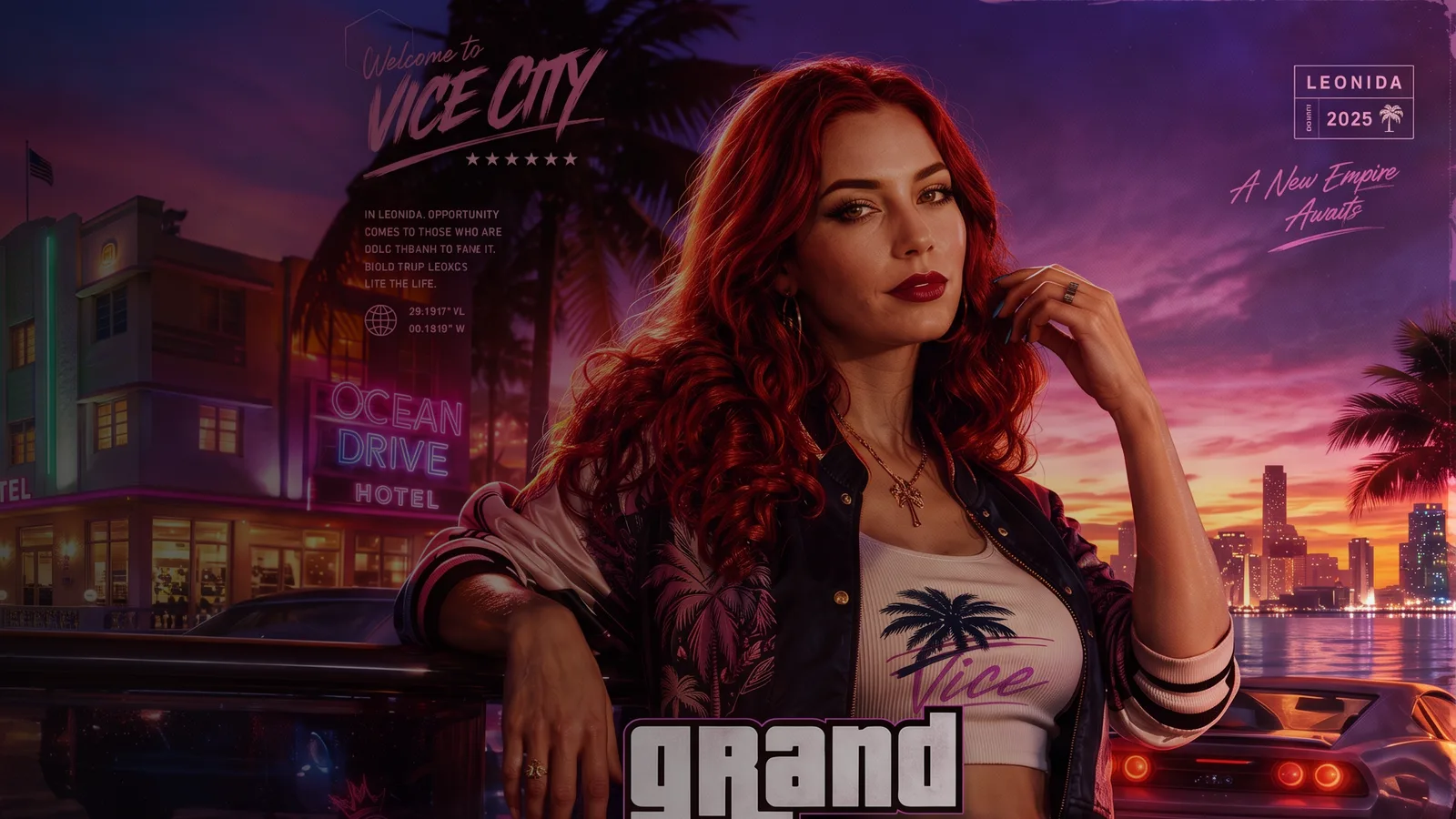
Automatica's GTA VI poster template turns a single photo into cover art inspired by the promotional artwork for Grand Theft Auto VI. You upload one picture, run the template and get a portrait poster with neon colour grading, palm-tree shadows and bold game-style title lettering. You don't need to write a prompt or touch an editor.
This guide covers what the template creates, how to use it, which photos work best and what to do with your GTA 6 poster once it's ready.
The template is built around one subject and one striking image. Every run gives you a new poster with:
Game-style title lettering: large "Grand Theft Auto VI" typography, backed up by smaller labels, symbols and graphic overlays inspired by AAA game posters.
A fresh pose: your subject is restaged with confident, editorial body language instead of copying the pose from your photo.
Streetwear styling: layered, colourful outfits and accessories that suit the Vice City mood.
Vice City atmosphere: neon light, a tropical city backdrop, luxury car silhouettes, nightlife details and glossy reflections.
A portrait layout: a 3:4 frame that suits profile pictures, portrait social posts and printed posters.
Open the template. Go to the GTA VI poster template in Explore and sign in or create an account.
Add the subject. Upload a photo to the "Add the subject" slot. A clear, well-lit photo of one person works best.
Generate. Run the template. It uses GPT Image 2 Edit at medium quality and returns one poster per run.
Review and repeat. Each run restages the pose and scene, so generate a few versions and keep your favourite.
Download or keep going. Save the PNG, add it to a collection or use it as the starting point for an edit or a video.
The template takes your likeness from the upload, so the photo matters more than anything else.
Show the face clearly: a front-on or three-quarter view with the eyes visible works better than sunglasses or a hat pulled low.
Use even light: daylight or soft indoor light keeps skin tone and features accurate. Harsh shadows and heavy beauty filters make the likeness less reliable.
Keep it to one person: the template has a single subject slot. Crop group photos down to the person you want on the cover.
Start with a sharp image: an original phone photo beats a screenshot or a compressed image saved from a chat app.
Keep the pose simple: the template creates a new one, so a plain portrait is enough.
The template keeps your likeness but deliberately builds a new pose, with asymmetrical body positioning, natural movement and strong eye contact, the way a fashion shoot would. It also restyles the outfit with layered streetwear so it suits the poster.
That is why a plain, passport-style photo can come back as a confident cover shot. If you want to keep your own clothes or pose, write your own variation instead. The next section shows how.
Setting | Value |
|---|---|
Model | GPT Image 2 Edit |
Image size | 3:4 Portrait |
Quality | Medium |
Images per run | 1 |
Output format | PNG |
Input | One photo of the subject |
You don't need to change anything. The prompt, model and settings are saved in the template, so every run follows the same art direction.
To control the scene yourself, upload your photo to Automatica and edit it with GPT Image 2 Edit, describing the poster you want. Keep the core ingredients and change one thing at a time. For example, "GTA VI-style cover art of the person in this photo, golden hour on a beachfront boulevard, pink convertible, palm trees, bold title lettering" or "night-time rooftop pool party, neon signs, city skyline behind, confident pose, same face and hairstyle".
When you land on a look you like, save it as your own template so you can reuse it with new photos.
A poster makes a strong first frame. Send it to an image-to-video model such as Kling O3 Image-to-Video or Seedance 2.0 Fast Image-to-Video and describe the motion, not the picture. Prompts like "slow push-in, neon signs flicker, palm leaves sway in a warm breeze" or "the subject turns to camera as headlights sweep past" keep the artwork intact while adding life.
For longer shots with native audio, read the Seedance 2.5 guide.
GTA Online effect: rebuild any photo as an in-game screenshot. Read how the GTA Online template works.
Animated character: upload a selfie to the Pixar-style character template and become a 3D animated film character.
Movie poster graffiti: turn a logo into graffiti art with the movie poster graffiti template.
Football poster: make a matchday poster for your favourite World Cup team with the football poster template.
Is this an official GTA 6 poster? No. It's a fan-style template inspired by the look of the game's promotional art. Automatica is not affiliated with Rockstar Games.
Can I use a photo of someone else? Yes, as long as they're happy for you to use their image. Birthday posters and group-chat surprises for friends work well.
Does the poster include text? Yes. The template adds large title lettering and smaller graphic labels. AI-generated text can occasionally contain mistakes, so check the lettering and run it again if needed.
What size is the poster? Each run returns one 3:4 portrait PNG. For large prints, upscale the image in Automatica first.
Can I use a group photo? The template has one subject slot, so crop the photo to the person you want on the cover.
Open the GTA VI poster template and upload a photo to make your own cover.

Automatica
18 posts
October 3, 2026
3 min read
October 3, 2026
3 min read
October 3, 2026
3 min read
October 2, 2026
7 min read
September 30, 2026
3 min read
September 30, 2026
4 min read
Explore powerful AI models and generate high-quality visuals in seconds. Build, experiment, and bring your ideas to life.